
Choose Your Desired Option(s)
Create Engaging Videos Without the Complexity of Professional Editing Tools
Video content has become an essential part of online communication, marketing, education, and entertainment. From social media clips and promotional videos to tutorials and personal projects, creators need accessible tools that make video production easier.
BeeCut Easy Video Editing Software provides a straightforward approach to video editing, helping users turn raw footage into polished visual content without having to master complicated professional editing applications.
With an approachable editing environment and practical video creation tools, BeeCut makes it easier for beginners, content creators, marketers, and everyday users to bring their video ideas to life.
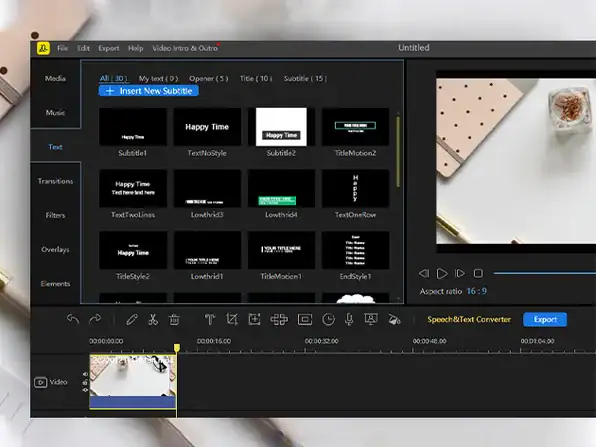
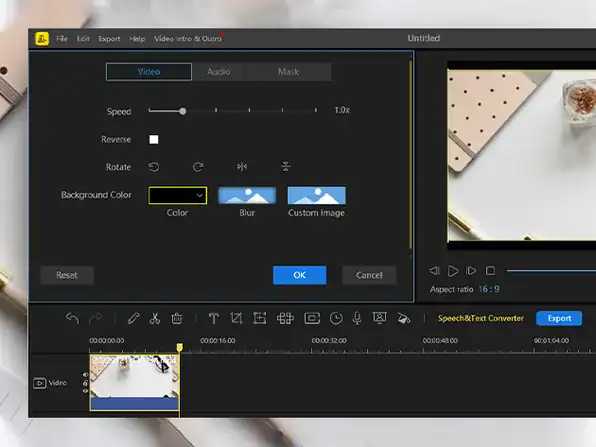
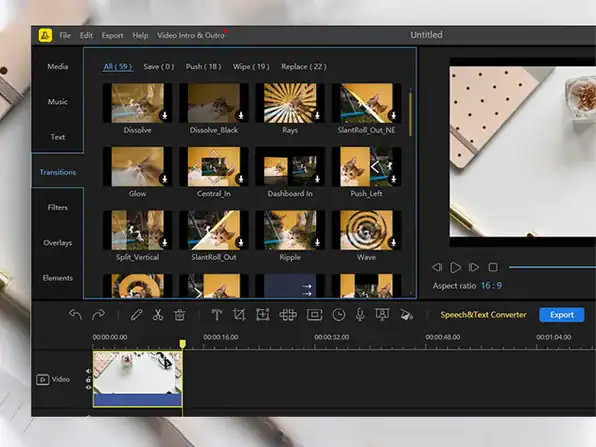
BeeCut is a simple video editor software that comes with lots of functions including chroma cutout, text and speech converting, dubbing, cropping, cutting, merging, making PIP, adding mosaic to video, zooming and freezing frame, etc. It offers you hundreds of crafted transitions, overlays, elements, texts, and filters. You can use it to make a quality video within minutes, no computer skills are needed!
The goal is to let anyone without training or experience easily create professional-looking videos. BeeCut also offers a built-in media library including millions of fashionable text, filer, overlay, transition, and element templates. This means that you will have access to everything you need to edit your own videos, share your ideas, set your creativity free, and tell your story.
What Is BeeCut?
BeeCut is an easy-to-use video editing application designed to simplify the process of creating and editing videos.
It offers an accessible way to work with video footage, arrange clips, add visual elements, and improve the overall presentation of video projects. Its beginner-friendly approach makes it suitable for users who want to produce attractive videos without dealing with an unnecessarily steep learning curve.
Whether creating content for social media, preparing a presentation, producing a tutorial, or editing personal recordings, BeeCut helps make video editing more approachable.
Who Can Benefit From BeeCut?
BeeCut is suitable for a wide range of users, including:
- Beginners: Individuals looking for an accessible introduction to video editing.
- Content Creators: Creators producing videos for online platforms and digital audiences.
- Social Media Marketers: Professionals preparing engaging promotional content.
- Small Business Owners: Businesses creating videos to showcase products, services, and brand messages.
- Educators and Trainers: Teachers and trainers developing instructional and educational videos.
- Students: Learners creating video assignments, presentations, and creative projects.
- Everyday Users: Individuals editing personal recordings, memorable moments, and family videos.
Key Features and Capabilities
1. Beginner-Friendly Video Editing
BeeCut is designed to make video editing easier to understand. Its approachable workflow helps users organize and edit footage without requiring extensive technical experience.
2. Timeline-Based Editing
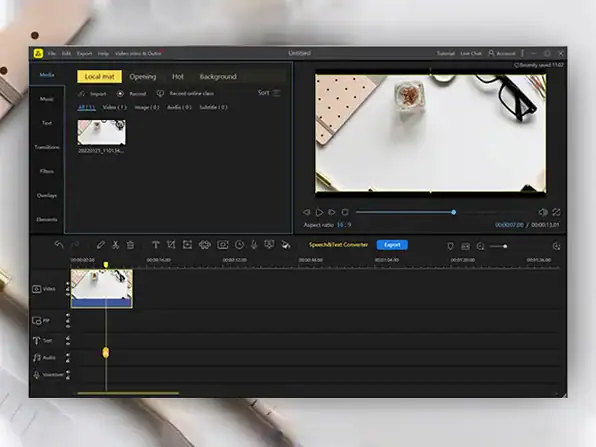
A timeline editing workflow helps users arrange video clips and work on the sequence of their projects. This makes it easier to structure footage and develop a coherent final video.
3. Add Visual Elements
Video projects can benefit from additional visual touches. BeeCut supports creative editing workflows that help users enhance the presentation of their footage.
4. Text and Titles
Titles and text elements can help communicate important information, introduce topics, and make videos more informative and engaging.
5. Transitions and Effects
Visual transitions and effects can help give video projects a more polished appearance while making changes between scenes more appealing.
6. Audio Editing
Sound plays an important role in video production. BeeCut provides audio-related editing capabilities that can help users improve the overall viewing experience.
7. Multiple Video Projects
From short social media clips to longer presentations and tutorials, BeeCut can support a variety of everyday video editing needs.
8. Video Exporting
Once editing is complete, users can export their projects into video files suitable for sharing and further use, subject to the software’s supported export settings.
Why Choose BeeCut?
Simplifies the Editing Process
Complicated editing software can discourage beginners. BeeCut offers a more approachable experience for users who want to focus on creating videos rather than learning an extensive set of professional tools.
Saves Time on Everyday Projects
A straightforward workflow can help users move from raw footage to a finished video more efficiently.
Supports Creative Expression
Video creators can organize footage, add visual details, and develop content that communicates their ideas more effectively.
Useful for Different Purposes
BeeCut can be used for personal projects, educational content, social media videos, business promotions, and other everyday editing tasks.
Makes Video Creation More Accessible
Users do not need to be professional editors to begin exploring video production. BeeCut provides an accessible starting point for developing practical editing skills.
What Can Users Create With BeeCut?
BeeCut can be used for a variety of video projects, such as:
- Social media videos and short-form content
- YouTube videos and channel content
- Product demonstrations and promotional clips
- Educational videos and tutorials
- Business presentations
- Personal videos and family memories
- Event highlights and travel videos
- Creative storytelling projects
Its versatility makes it a useful option for users who regularly work with video content.
A Practical Video Editing Solution for Everyday Creators
The demand for video content continues to grow, making accessible editing software increasingly valuable. BeeCut helps reduce the barriers to video creation by offering an approachable editing experience for users with different levels of experience.
Instead of struggling with overly complicated software, users can focus on organizing footage, improving presentation, and creating videos that communicate their message.
Start Creating Better Videos With BeeCut
From personal memories to business promotions and social media content, BeeCut Easy Video Editing Software provides a convenient way to explore video editing and bring creative ideas to life.
For beginners, content creators, students, and businesses seeking an accessible video editing solution, BeeCut offers a practical starting point for producing engaging video content.
Discover BeeCut today and make video editing a simpler, more creative experience.
Your Recently Viewed Downloads
 The CompTIA & IT Exam Study Guides Training Lifetime Deal
 Referly Atlas Ad Tracking Software For Online Stores Lifetime Deal
 Free AI Prompts Library Free Lifetime Deal
You may also like


Share Now!
Latest Lifetime Deals










Featured Lifetime Deals










Related Products
Popular & Trending


Featured Products